

Records your screen and not only, it comes equipped with many features. It can edit almost everything that is recorded. Adds 4k details to an existing video, or adds music and various sounds to your recording already becoming films. Creates tutorials and adds voices, subtitles, etc to your videos.
Defining and categorizing Camtasia is becoming more and more complex with every new version. What used to be the reference tool for screen capture and screen recording is now also a feature-rich multi-track video editor, producer, and enhancer. Thus, praising its professional HD-quality video recording capabilities is only going half the way. Camtasia is still the model for intuitive and high-quality tutorial and demo video production, but it is also slowly but surely becoming a serious contender for well-established video-editing tools.
Camtasia’s screen recording capabilities excel not only in usability but also in the quality of the output. Setting up the program for a new screen capture is extremely simple. The program’s main interface disappears and a small window pops up with just the controls you need to design the new task. Select the area to capture, whether you want to include audio and your webcam feed or not, and you’re ready to go. There are a few other settings that you can set up beforehand, such as the output quality of the recording or the cursor effects, including the sound of your mouse clicks. (Though the trial version won’t let you include your mouse pointer in the final recording, you can see how it works by tweaking some post-production settings.) You can capture audio from any external microphone and enable or disable the system audio. Alternatively, you can add a voice narration in real time in post-production as you watch your recording, and even mix various audio tracks using the timeline provided. If you happened to choose Full HD for the output, rest assured that the final result will fulfill all your expectations in terms of quality down to the pixel.
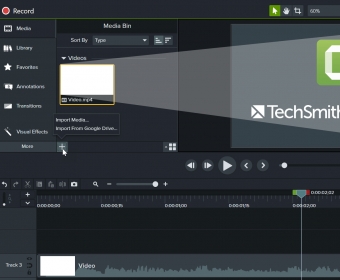
As said, Camtasia has gradually incorporated a set of professional editing tools that make other similar tools pale in comparison. From transitions to annotations (callouts, shapes, text, arrows, etc.), from animations to audio effects (noise removal, fade in and out, etc.), and from visual effects (shadows, different video speeds, color adjustment, color removal, etc.) to a professional green screen effect, the program offers you all you need to produce high-end movies and tutorials. All of these editing tools can also be used with existing video recordings and to create multimedia presentations with all kinds of media files. The program is highly intuitive, allowing for drag-and-drop editing in most cases, and its timeline-based interface makes mixing and combining tracks and media files a child’s play. Professional video recording and editing has never been this easy.






Comments (30)